
Rails7 stimulusを使用してフォームにリアルタイム検索フィルターをつくる
- 作成日 2024.07.08
- rails

Ruby on Rails 7で、stimulusを使用してフォームにリアルタイム検索フィルターをつくるサンプルコードです。
目次
環境
- OS Ubuntu24.04
- rails 7.1.3
Stimulusのインストール
Rails 7では、Stimulusがデフォルトでセットアップされているため、追加のインストールは不要ですが、念のため以下のコマンドで確認します。
$ bundle exec rails stimulus:installScaffoldの作成
サンプルデータとして、Productモデルを作成します。
$ rails generate scaffold Product name:string description:text
$ rails db:migratedb/seeds.rbにいくつかのサンプルデータを追加します。
# db/seeds.rb
Product.create(name: "Product 1", description: "Description for product 1")
Product.create(name: "Product 2", description: "Description for product 2")
Product.create(name: "Product 3", description: "Description for product 3")
以下のコマンドを実行してサンプルデータをデータベースに追加します。
$ rails db:seedStimulusコントローラーの作成と設定
Stimulusコントローラーを生成します。
$ rails generate stimulus Search生成されたコントローラーを以下のように編集します。
// app/javascript/controllers/form_validation_controller.js
import { Controller } from "@hotwired/stimulus"

export default class extends Controller {
  static targets = ["input", "results"]

  connect() {
    this.timeout = null;
  }

  filter() {
    clearTimeout(this.timeout);

    this.timeout = setTimeout(() => {
      const query = this.inputTarget.value.toLowerCase();

      fetch(`/products?query=${query}`, {
        headers: {
          Accept: "application/json"
        }
      })
      .then(response => response.json())
      .then(data => {
        this.resultsTarget.innerHTML = "";

        data.forEach(product => {
          const productElement = document.createElement("div");
          productElement.innerHTML = `<strong>${product.name}</strong>: ${product.description}`;
          this.resultsTarget.appendChild(productElement);
        });
      });
    }, 300);
  }
}
HTMLの設定
app/views/products/index.html.erbを以下のように編集します。
<h1>Products</h1>

<div data-controller="search">
  <input data-search-target="input" type="text" placeholder="Search products..." data-action="input->search#filter">
  <div data-search-target="results">
    <% @products.each do |product| %>
      <div>
        <strong><%= product.name %></strong>: <%= product.description %>
      </div>
    <% end %>
  </div>
</div>
コントローラーの編集
リアルタイム検索を実装するために、ProductsControllerを編集します。app/controllers/products_controller.rbを以下のように編集します。
# app/controllers/products_controller.rb
class ProductsController < ApplicationController
  def index
    @products = if params[:query].present?
                  Product.where("lower(name) LIKE ?", "%#{params[:query].downcase}%")
                else
                  Product.all
                end

    respond_to do |format|
      format.html
      format.json { render json: @products }
    end
  end

  # 他のアクション
end
Railsサーバーの起動
最後に、Railsサーバーを起動して動作を確認します。
※自分の環境は外部からアクセスできるようにして起動してます。
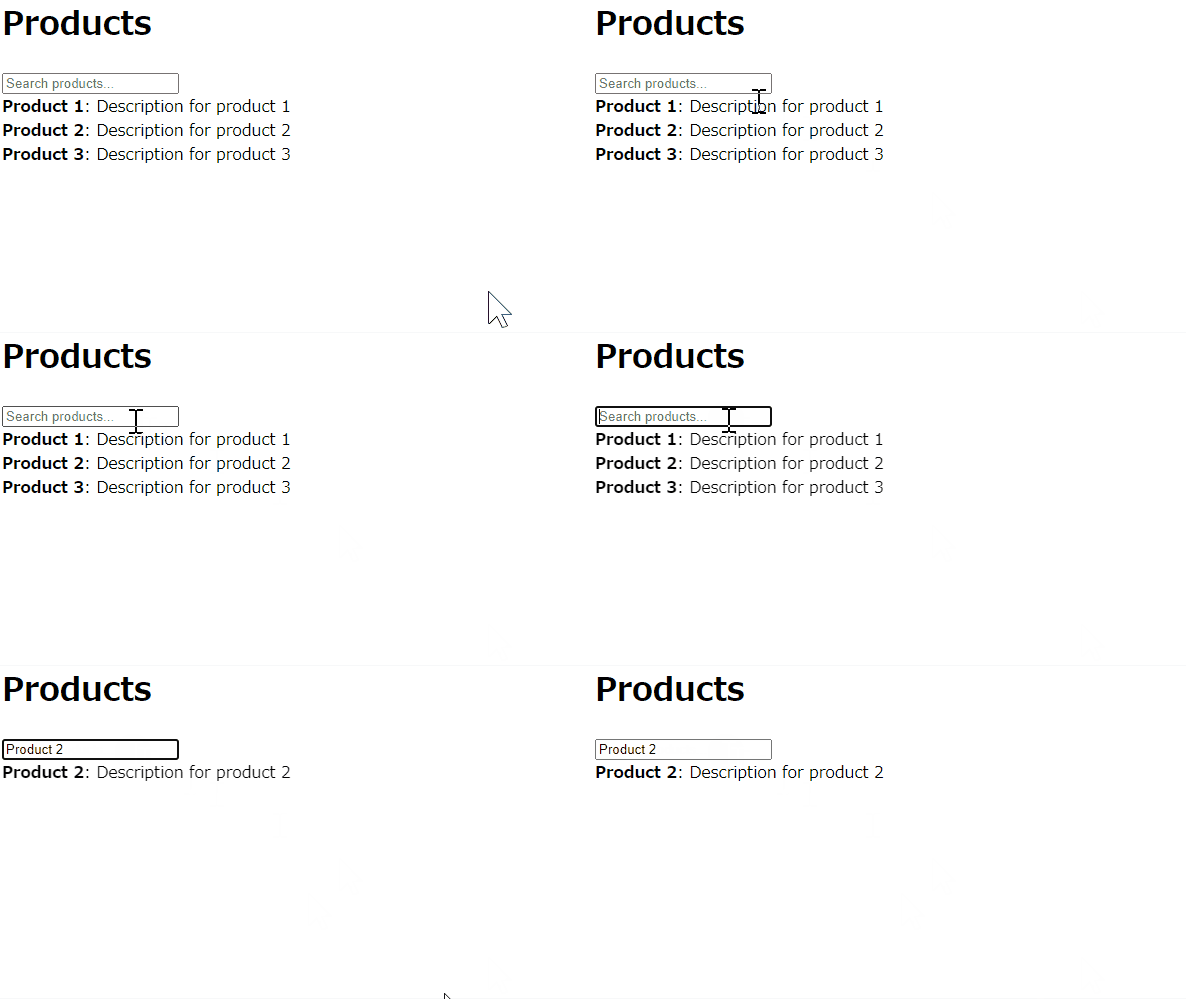
$ rails s -b 0.0.0.0ブラウザでhttp://localhost:3000/productsにアクセスし、検索フィールドに文字を入力してリアルタイム検索が正しく動作することが確認できます。
-
前の記事

MariaDB 回数を指定して文字列を繰り返し表示する 2024.07.08
-
次の記事

Oracle Database 全システム統計名称の情報を確認する 2024.07.08